

このヘルプページはStudio向けです。 この情報はDesktop Studioでも利用可能です。
|
```
|
DNCグループに電話番号を追加します。これにより、ACDのスキル |
 ```
サポートされているスクリプトタイプ
|
|
| 電話 |

入力プロパティ
これらのプロパティは、アクションが実行時に使用するデータを定義します。
|
プロパティ |
説明 |
|---|---|
|
キャプションを追加 |
スクリプト内でこのアクションを一意に識別できる、短いフレーズを入力します。 アクションアイコンにカーソルを合わせるとキャプションが表示されます。 |
| グループ | The group to which the phone number will be added. The default for this property is the default group for the tenant. For more information, see Setting the Default Do Not Call (DNC) Group. |
| 電話番号 | The specific phone number you want to use. |
| エージェント番号 | Specifies the agent ID that initiated the action. No entry in this property means the system will use 0 as the agent number. To set this property to the agent of the current contact, use {global:__AgentID}. |
| 失効日付 | Date of expiration for the group. The expiration applies only to this group. No entry in this field means the group never expires. You can enter only the current date or a future date. |
結果の分岐条件
結果の分岐条件を使用すると、アクションが実行されたときにさまざまな結果を処理できるように、スクリプトにブランチを作成できます。
|
条件 |
説明 |
|---|---|
|
デフォルト |
Path taken unless the script meets a condition that requires it to take one of the other branches. It is also taken if the action's other branches are not defined. |
|
Error |
Path taken when the action fails to execute properly. For example, when there is an unexpected problem such as poor connectivity, syntax errors, and so on. The _ERR variable, with a single underscore character, should be populated with a condensed explanation of the problem. |
スクリプトの例
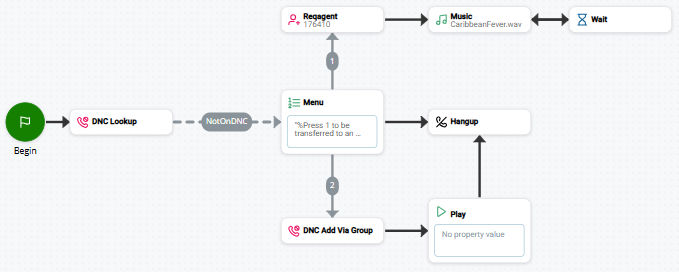
これは、このアクションをスクリプトでどのように使用できるかを示す例です。 完全なスクリプトではありません。 追加のスクリプト作成が必要な場合があります。
このDnclookupアクションのスクリプト例では、電話番号が架電禁止リストに含まれているかどうかを確認します。 番号がリスト内にない場合、MENU アクションは2つのオプションを提供します。 連絡先は、1をクリックしてエージェントを要求するか、2をクリックして電話禁止グループに追加できます。 電話番号がグループに追加されると、グループに割り当てられているACD スキル エージェントのスキル、能力、知識に基づいてインタラクションの配信を自動化するために使用されます。に割り当てられているすべての発信禁止リストにも追加されます。
このスクリプトをダウンロードしてください。