

Voice ACD skills Used to automate delivery of interactions based on agent skills, abilities, and knowledge. enable phone calls to and from your contact center. You can use different types of voice ACD skills:
- Manual outbound: Agents use the address book or the keypad to place calls to contacts and to other agents. Agents must have a manual outbound voice ACD skill to transfer calls to other agents.
- Personal Connection dialer: Calls are automatically dialed from a calling list you create. You can do this by having a script import it from your CRM or by uploading it manually. The dialer can assign calls to an agent or play a recording for the contact.
- Outbound Engagement (SmartReach): A proactive engagement solution that offers omnichannel campaign automation, allowing you to seamlessly manage outbound communication, including manual and agentless outbound voice calls .
- Inbound voice: Contacts can place calls to your contact center. If your environment uses an IVR Interactive Voice Response. Automated phone menu contacts use via voice or key inputs to obtain information, route an inbound voice call, or both. menu, you need to create a new inbound voice ACD skill per IVR option.
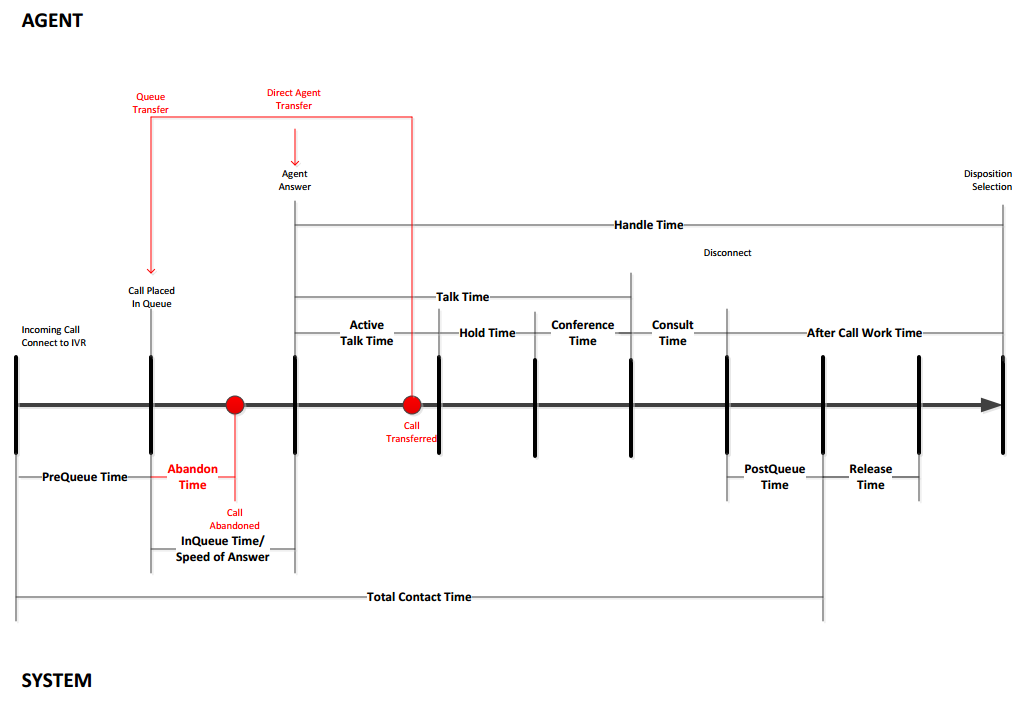
View image of an inbound voice interaction workflow
All inbound voice contacts follow the same workflow. It doesn't change based on your routing or ACD skill settings.
If you make a lot of outbound calls, your calls may begin to be marked as spam. These tips can help you avoid this:
- Add Caller ID Name (CNAM) services or Universal Call Branding to your environment.
- Add STIR/SHAKEN to your environment and configure your numbers for A-level attestation.
- Don't call the same lead too frequently.
- Keep your dialer drop rate under 3%.
- Make sure contacts can reach you if they try to call back.
- Verify you aren't making marketing calls to numbers on the National Do Not Call Registry.
- Place your calls over several geographic regions. This spreads the calls out over multiple receiving carriers and call blocking systems.
- Rotate the caller ID you use for outbound ACD skills periodically.
- Obtain a local phone number for each region, state, or area code you're calling.
- Register your phone number with the major caller ID reputation registries.
Customized Voice Experience
You can customize the voice experience. This includes:
- Using Studio scripts to:
- Create an IVR Interactive Voice Response. Automated phone menu contacts use via voice or key inputs to obtain information, route an inbound voice call, or both. or ASR Automatic Speech Recognition. Allows contacts to respond to prompts by speaking, pressing phone keys, or both. for inbound calls.
- Set hold music.
- Use events in the interaction to trigger actions. Possible triggering events include when a contact is answered, transferred, or ended.
- Create an IVR
- Using the routing methods and tools that work best for your organization's needs. The following options are available:
- Dynamic delivery
- Integrated matching (requires dynamic delivery)
- Real-time routing rules
- Agent capacity profiles
- Routing attributes (requires integrated matching)
- Bullseye routing
- AI Routing
Scripts easily become complicated. If you need help with your voice scripts, contact your NiCE CXone account representative.
Key Facts about Voice
- If you want compliance verification for your manual outbound calls, use Outbound Engagement (SmartReach). Ask your NiCE CXone account representative for more information.
- For manual outbound and dialer ACD skills, you can choose the telecom route the outbound traffic routes through. This lets you process network traffic differently for a certain ACD skill. It can also let you deliver calls from a number that is local to the contact.
- You can set up voicemail interactions using a separate voicemail ACD skill.