
NOTE

此説明頁面適用於 Studio。 此資訊亦適用於 Desktop Studio。

A speech bubble with horizontal lines inside.

允許您在程式碼畫布上放置 note。 Note動作:

  • 不需要。
  • 無須連接到任何其他動作。
  • 可以位於畫布上的任何地方。
  • 在畫布上顯示為實體黑色語音氣泡 Icon of a solid dark speech bubble.,當尚未在 Comments 屬性中新增任何文字時。
  • 在畫布上顯示為一個紫色語音氣泡 Icon of a solid solid speech bubble with horizontal lines.,當Comments 屬性包含文字時,其內會顯示橫向線條。

建議的最佳做法是使用備註,因為程式碼的文件記錄越清晰,其他開發人員和支援人員就越容易使用。您也可以使用標註為使用者新增資訊。

支援的程式碼類型

一個正方形,其上有一條通往其他三個正方形的分支線。

Icon of gray-green envelope

深綠色語音氣泡圖示

Icon of purple telephone handset

鏽色留言符號圖示,由兩個以線條相連的圓形組成

Icon of pink document with lines of text

Icon of green mobile phone with a speech bubble on its screen

Icon of purple computer monitor with a mobile device overlapping its lower right corner

通用

電郵 聊天 電話 語音郵件 工作項目 SMS Digital

輸入屬性

這些屬性定義了動作執行時使用的資料。

屬性

描述

新增標題

Enter a short phrase that uniquely identifies this action in the script. The caption appears on the script canvas under the action icon.

備註

您想要留給其他開發人員或程式碼開發人員的note或訊息的文字。

結果分支條件

無。

程式碼範例

Note 動作不需要連接到程式碼中的其他動作。
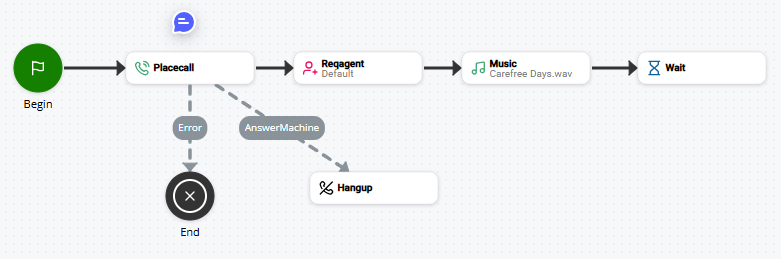
包含 NOTE 動作的範例指令碼