
Cette page d'aide concerne Studio. Ces informations sont également disponibles pour Desktop Studio.
|
|
Vérifie l'état d'un Agent spécifique. |

Types de scripts pris en charge
|
|
|
\n |
|
|
|
|
|
Générique |
Conversation | Téléphone | Messagerie vocale | Élément de travail | SMS |


 \n


Propriétés de saisie
Ces propriétés définissent les données que l'action utilise lors de son exécution.
|
Propriété |
Description |
|---|---|
|
Ajouter une légende |
Entrez une courte phrase qui identifie cette action dans le script de manière unique. La légende est affichée sur le canevas de script sous l’icône de l’action. |
| Id de l’agent | L'ID de l'agent. Entrée un ID ou type pour trouver un agent spécifique. Vous pouvez utiliser une variable pour ce champ, telle que |
| Variable d’état |
Variable that holds the agent state The availability status of an agent., such as Available, Unavailable, and so on.
La valeur par défaut est ETAT. |
| Variable de raison | The variable that holds the specific description of the agent state. |
Conditions de la branche résultat
Les conditions de branche de résultat vous permettent de créer des branches dans votre script afin de gérer différents résultats lors de l'exécution d'une action.
|
Condition |
Description |
|---|---|
| Par défaut | Path taken unless the script meets a condition that requires it to take one of the other branches. It is also taken if the action's other branches are not defined. |
| NotLoggedIn | Path taken if the agent is not logged in. |
| Disponible | Path taken if the agent is logged in and available. |
| Non disponible | Path taken if the agent is logged in but not available. |
| Contact entrant | Path taken if the agent is logged in and engaged with an inbound contact. |
| Contact sortant | Path taken if the agent is logged in and engaged with an outbound contact. |
| InboundConsult | Path taken if the agent is in a state The availability status of an agent. where they will be accepting inbound consults. |
| OutboundConsult | Path taken if the agent is in a state where they will be accepting outbound consults. |
| Composeur | Path taken if the agent is logged in to an outbound dialing skill. |
| LoggedIn | Path taken if the agent has logged in to the system but has not yet set the agent state. |
Exemple de script
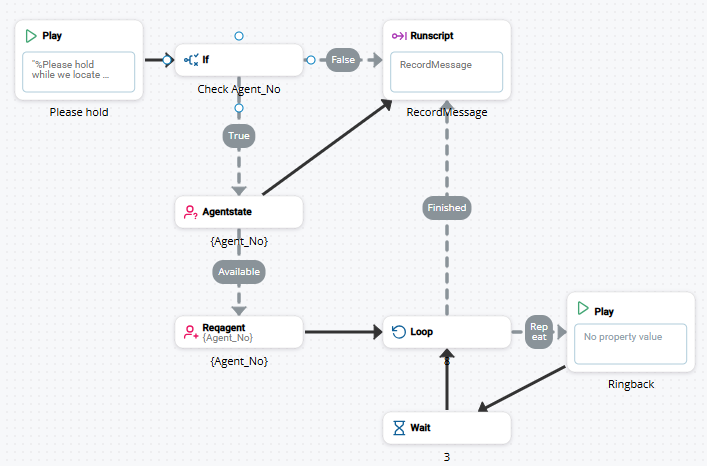
Cet exemple montre comment cette action peut être utilisée dans les scripts. Il ne s'agit pas d'un script complet. Des scripts supplémentaires peuvent être nécessaires.
Dans cet exemple de script téléphonique, l'action IF vérifie l'existence d'une valeur spécifique d'ID d'agent. Si tel est le cas (VRAI), alors état de l'agent vérifie la disponibilité de cet agent. Si cet agent est disponible, Reqagent demande cet agent spécifique. Si non, l'appel va au script (viaRunsub) utilisé pour enregistrer un message.