

Lorsque vous traitez une interaction The full conversation with an agent through a channel. For example, an interaction can be a voice call, email, chat, or social media conversation. dans Unified Agent Workspace for ServiceNow, un enregistrement d'interaction s'affiche. Il fournit des informations sur l'interaction, notamment son numéro d'ID, son responsable et son état actuel. Il fournit également des informations sur le contact The person interacting with an agent, IVR, or bot in your contact center., telles que ses cas récents et ses interactions passées. Trois onglets s'affichent :
-
Détails : affiche des informations générales sur l'interaction.
-
Informations client : affiche des informations sur le contact et ses ServiceNow cas.
-
Historique client : liste les interactions passées avec le contact.
-
Tâches associées :
Vous pouvez modifier certains champs dans les enregistrements d'interaction. Pour enregistrer vos modifications, cliquez sur Autres actions  > enregistrer.
Onglet détails
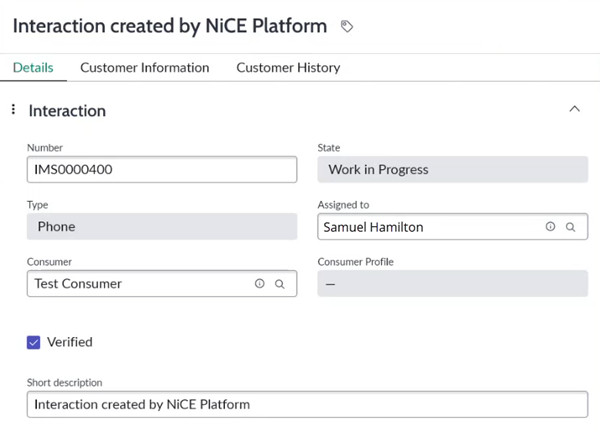
| Champ | Détails |
|---|---|
| Numéro | The unique ID number for the interaction The full conversation with an agent through a channel. For example, an interaction can be a voice call, email, chat, or social media conversation.. |
| État | L'état de l'interaction, tel que Travail en cours ou Fermé terminé. |
| Type | Le canal Various voice and digital communication mediums that facilitate customer interactions in a contact center. de l'interaction, tel que Téléphone ou E-mail. |
| Assigné à | L'agent a attribué l'interaction. |
| Compte | L'enregistrement de compte pour le contact The person interacting with an agent, IVR, or bot in your contact center. associé à l'interaction. Pour le modifier, cliquez sur la loupe  et sélectionnez un compte dans la liste. Il est possible que ce champ ne s'affiche pas. |
| Contact | L'enregistrement Contact pour le contact The person interacting with an agent, IVR, or bot in your contact center. associé à l'interaction. Pour le modifier, cliquez sur la loupe et sélectionnez un contact dans la liste. Ce champ peut ne pas apparaître. |
| Consommateur |
L'enregistrement Client pour le contact |
| Profil de consommateur | Un lien vers plus d'informations sur le contact, contenues dans son enregistrement Consommateur. |
| Vérifié | Case à cocher indiquant si le contact est vérifié. |
| Description courte | Le titre de l'interaction. |
Onglet Informations client
Cet onglet n'affiche des données que si un enregistrement Consommateur est lié dans l'onglet Détails.
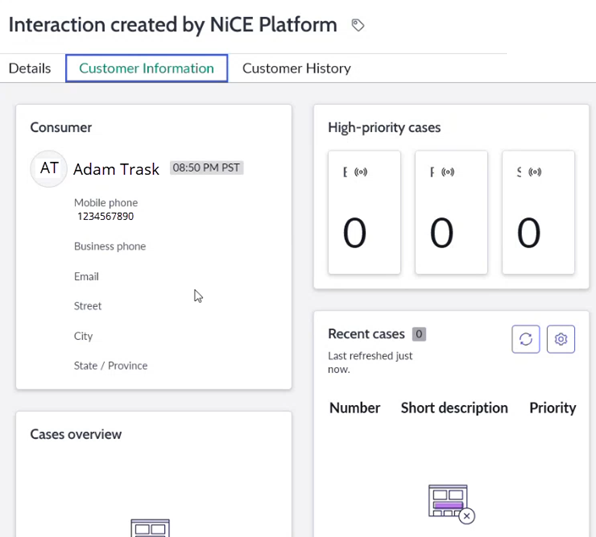
| Champ | Détails |
|---|---|
| Consommateur |
Affiche les informations de base sur le contact |
| Cas à priorité élevée | Affiche le nombre de cas escaladés, P1 et en infraction de SLA pour le contact. |
| Vue d’ensemble des cas | Affiche des informations de base sur les cas du contact, telles que les états et la programmation. |
| Cas récents | Affiche le numéro d'identification, la description courte et le niveau de priorité des cas les plus récents du contact. |
Onglet Historique du client
Cet onglet affiche des données uniquement si un enregistrement Consommateur est lié dans l'onglet Détails.
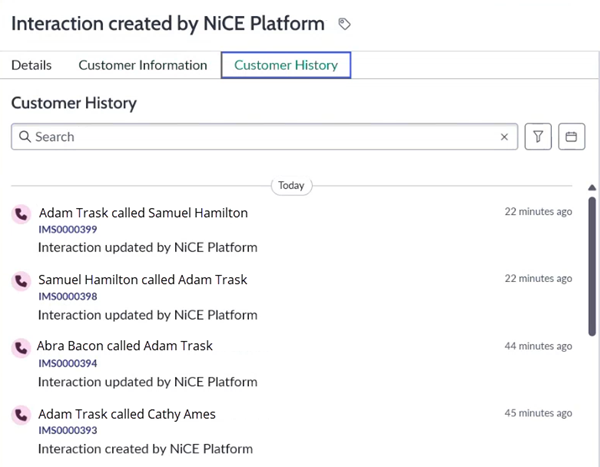
L'onglet Historique Client affiche une liste des interactions passées avec le contact The person interacting with an agent, IVR, or bot in your contact center.. Pour chaque interaction The full conversation with an agent through a channel. For example, an interaction can be a voice call, email, chat, or social media conversation., il indique le canal Various voice and digital communication mediums that facilitate customer interactions in a contact center., l'agent, le numéro d'enregistrement de l'interaction, ainsi que le temps écoulé depuis qu'elle a eu lieu dans le passé.