

Required permission: Business Unit Attendant > On Business Unit Attendant > Edit
This page is for administrators. If you're an Attendant user, see Attendant for Users.
Attendant requires the purchase of additional licenses and must be enabled in your system before you can configure it.
The settings that you configure at the tenant High-level organizational grouping used to manage technical support, billing, and global settings for your NiCE CXone system. level apply to all Attendant users. Some options can also be configured at the user level. User-level configurations override the
You can configure the following settings at the business unit level:
- Allow users access to the Attendant web application.
- How users are notified of new voicemail messages. You can set this option for individual users.
- How the system keeps long voicemail messages.
- Allow users to set an Out of Office status.
- Allow users to download voicemail messages.
- Enable the system to notify users when they have missed calls.
- Whether the system releases DID and extensions when users are deactivated.
- Allow offline agents to receive voicemails from transferred contacts. You can set this option for individual users.
-
Click the app selector
 and select ACD.
 -
Go to ACD Configuration > Business Units.
- On the NiCE CXone Attendant tab, click Edit.
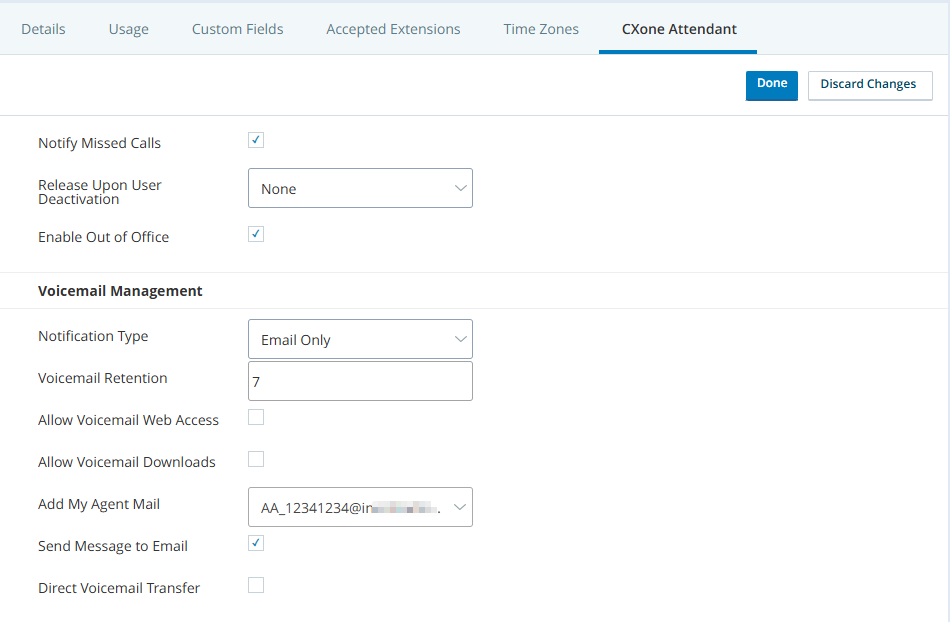
- Select Notify Missed Calls if you want your agents to be notified of missed calls. Agents may choose to be notified in different ways after this is configured. By default, agents are notified using the method selected for Notification Type.
- In Release Upon User Deactivation, configure what you want to happen to extensions and Direct Inward Dialing Direct Inward Dial (DID). Service that assigns a unique phone number to each employee without a phone line for each number. (DID) when users are deactivated.Learn more about fields in this step
Field
Details
Release Upon User Deactivation None: The user's extension and DID stay assigned to them when they are deactivated.
Extension and DID: The user's extension and DID are released when the user is deactivated. You can then assign them to another user.
Extension Only: The user's extension is released when the user is deactivated. Their DID stays assigned to them.
DID Only: The user's DID is released when the user is deactivated. Their extension stays assigned to them.
- Select Enable Out of Office to allow users to set their status to Out of Office so that Attendant will forward calls to their backup user. You can configure default backup users on a per-user basis, and each user can override their default backup when they change their status.
-
Under Voicemail Management, select the default Notification Type and enter the Voicemail Retention time period.
Learn more about fields in this step
Field
Details
Notification Type Select the default voicemail notification method for users in this business unit:
- Email Only: The user receives an email notification for each new voicemail message or missed call. Requires that the user have access to voicemail messages via the Attendant application or by phone. The missed call notification requires Studio scripting to enable.
- Email with File Attachment: The user receives an email notification containing the voicemail message as an audio file attachment. This does not require additional access to voicemail messages (such as by phone or the Attendant application). The missed call notification requires Studio scripting to enable and will be an email with no attachment.
You may need to update your email server security to ensure these emails are not quarantined. - Web Only: The user sees new voicemail messages in the View Voicemail Message section of the Attendant application. For missed calls, this option will send the notification as an email. The missed call notification requires Studio scripting to enable.
- Via Agent: The user receives notification of new voicemails or missed calls via Agent messages. The user must be a NiCE CXone agent to use this option, and must have access to voicemail messages via the Attendant application or by phone. The missed call notification requires Studio scripting to enable.
You can assign a different default notification type on a per-user basis, and users can override the default at any time in the Attendant application.
Voicemail Retention Enter the number of days you want Attendant to keep voicemail messages before automatically deleting them. Valid values are numbers between 1 and 120. -
If you want to, select Allow Voicemail Web Access, Allow Voicemail Downloads, and Notify Missed Calls.
The Allow Voicemail Web Access option enables access to the Attendant web application. If your organization does not use voicemail with Attendant, but does use the Out of Office feature, users can use the Attendant application to manage their Out of Office status.
Learn more about fields in this step
- Click Done.