

This feature supports both Copilot for Agents and Copilot Automated Summary (AutoSummary). The term Copilot for Agents is sometimes used to refer to both unless noted otherwise.
Engagement Hub (Multi‑ACD) Copilot lets you use Copilot for Agents on voice interactions handled by third‑party telephony platforms such as Avaya, Cisco, and Genesys. CXone Recording Management (CXone) captures the calls in real time, routes them through Engagement Hub, and applies Real Time AI Policies to decide when and how Copilot should assist agents.
Engagement Hub (Multi‑ACD) Copilot relies on the following components:
-
Third‑Party Telephony (Avaya / Cisco/ Genesys): These platforms handle call routing outside of CXone and are the source of the voice interactions that Engagement Hub processes.
-
CXone Recording Management (CXone): This service connects to the third‑party telephony system to capture live audio and interaction metadata such as, agent, team, and call direction in real time.
-
Engagement Hub (Multi‑ ACD): This layer normalizes interactions from multiple ACDs so they can be processed consistently by downstream applications, including Copilot.
-
Real Time AI Policies: These policies define when Copilot should start and specify which Transcription and Copilot for Agents profile to apply for a matching interaction.
-
Transcription Profiles: These profiles determine how call audio is converted into real‑time text, including engine selection, language, and participant settings.
-
app Copilot Profiles: These profiles control what Copilot can do during the call and what guidance or suggestions it provides to the agent in the desktop UI.
-
-
Engagement Hub with third‑party telephony supports voice interactions only.
-
The following Copilot features are not available in this scenario:
-
Journey Summary
-
Self‑Service Summary
-
Task Assist
-
-
Copilot uses a standalone UI for third‑party telephony, which differs from the CXone‑native Copilot experience.
-
Division fields appear only if the tenant has a Division license.
Prerequisites
To enable multi- ACD engagement hub support for Copilot for Agents make sure that:
-
You have Admin access in CXone.
-
CXone Recording Management (CXone) is enabled.
-
Your tenant is configured as an external tenant for third‑party telephony.
-
Complete the required telephony setup for your vendor by configuring the Avaya, Cisco, or Genesys environment for real‑time third‑party telephony recording.
-
Required licenses are available:
-
Copilot for Agents
-
Engagement Hub (Multi‑ ACD)
-
How to Enable Multi-ACD Engagement Hub
-
Verify real‑time recording by placing a test voice call from the Avaya or Cisco environment and confirm the following,
-
The interaction appears in the list: Use Interactions: Search and Playback to verify that the interaction is visible in the interactions list. While reviewing the results, inspect the available metadata columns (such as Agent, Team, and Call Direction) based on your tenant’s configuration.
-
The audio is recorded: From Interactions: Search and Playback, open the interaction and play back the recording to confirm that audio was successfully captured.
-
The Agent, Team, and Call Direction at the contact level: Use the Contact History Report to verify that Agent, Team, and Call Direction are correctly populated for the specific contact.
-
Recording coverage during the test window: Use the Recording Activity Report to confirm which interactions were recorded during the test time frame and to validate overall recording behavior.
-
-
Create a transcription profile. For detailed instructions, see Transcription Hub.
-
Configure Real Time AI Policy.
-
Go to Admin > Recording > Real Time AI Policies.
-
Click New Policy. The app displays the policy creation form, where you define the settings and scope for a new real‑time AI policy.
-
Select the required profiles:
-
Agent Copilot Profile
-
Transcription Profile
-
-
-
Define the policy filters by specifying one or more of the following:
-
Teams or Users
-
Call Direction (Inbound or Outbound)
-
-
Click Save to apply the policy.
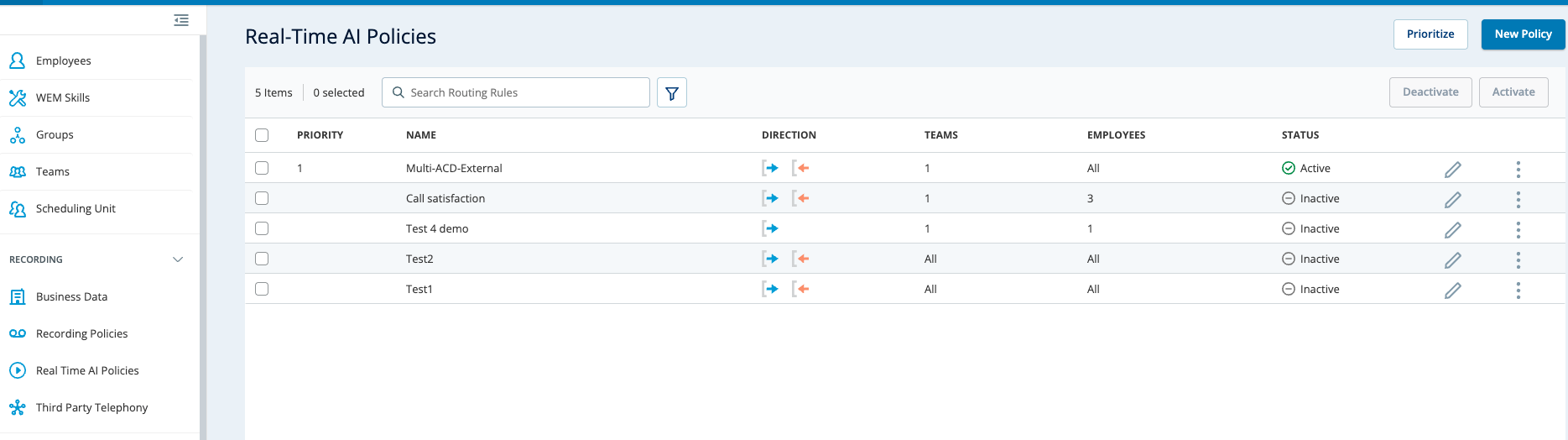
Validate Real‑Time Copilot and Transcription Guidance
-
Sign in to NiCE CXone as an agent targeted by the Real‑Time AI policy.
-
Place a test voice call from the Avaya, Cisco, Genesys environment.
-
Confirm that real‑time transcription is visible during the interaction.
-
Confirm that Copilot guidance appears while the interaction is in progress.
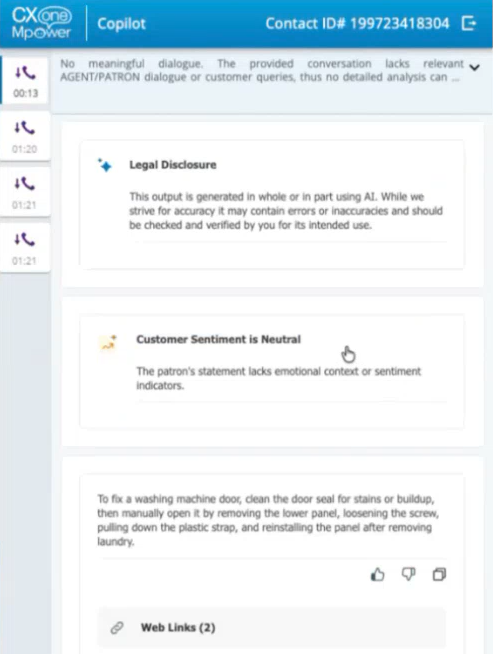
-
Policy: Sales NA – Inbound Copilot
-
Filters: Team = Sales – North America; Call Direction = Inbound
-
Profiles: Transcription = EN‑Realtime; Agent Copilot = Sales‑Assist
-
-
What happens on a matching Cisco call: The system applies EN‑Realtime for live speech‑to‑text and activates Sales‑Assist to show sales guidance in the agent desktop.
Copilot for Agents for Engagement Hub: Regional Availability and Feature Support
Copilot for Agents for Engagement Hub is available across multiple regions and supports additional capabilities and integrations based on deployment clusters.
Prerequisites
To use Copilot for Agents for Engagement Hub:
-
Your CXone tenant must be provisioned in a supported region (North America, Europe, or Australia).
-
Your deployment must be on a cluster that supports Copilot for Agents for Engagement Hub.
-
Your environment must support the required telephony codec (u-Law or A-Law, depending on region).
-
Feature availability depends on region and cluster support.
-
Ensure your tenant and cluster support the required features before enabling Copilot for Agents for Engagement Hub.
Supported Regions
Copilot for Agents for Engagement Hub is available in the following regions:
-
North America
-
Europe (EU clusters)
-
Australia (AU clusters)
Automated Summary (AutoSummary) for Engagement Hub is also available in all supported regions.
Supported ACD Platforms
Copilot for Agents for Engagement Hub supports the following third-party ACD platforms:
-
Cisco
-
Avaya
-
Genesys
For information on third-party multi-ACD platform versions supported by Copilot for Agents in Engagement Hub, refer to the Supported Real-Time Third Party Telephony Recording (Multi-ACD) Deployments topic.
Codec Support
Copilot for Agents for Engagement Hub supports the following telephony codecs:
-
u-Law (commonly used in North America)
-
A-Law (supported for deployments in Europe and Australia)
Supported Features
The following capabilities are supported for Engagement Hub deployments:
Rules
You can use the Copilot Rules to control how Copilot behaves during Engagement Hub interactions. You can:
-
Enable or disable Copilot based on channel, queue, or media type
-
Trigger Copilot behaviors based on customer intent or attributes
-
Configure different behaviors by brand, line of business, or region
-
Rules configured in the Copilot Rules apply to Engagement Hub interactions.
GenAI Prompts
You can use GenAI Prompts to tailor Copilot behavior for Engagement Hub. You can:
-
Define tone, style, and response guidelines
-
Provide business-specific instructions
-
Configure prompts for different queues, brands, or contact reasons
GenAI Prompts are configured in the Copilot configuration UI and apply to:
-
Agent guidance
-
Conversation summaries
-
Suggested responses (if enabled)