
The information on this help page applies to both Studio and Desktop Studio.
Digital scripts are used for contacts in NiCE CXone on digital channels Various voice and digital communication mediums that facilitate customer interactions in a contact center., such as social media public and messaging channels, direct messaging apps including WhatsApp, and website-based chats including Apple Messages for Business. NiCE CXone handles digital interactions differently from traditional ACD interactions. These differences impact the management and routing of digital contacts.
In NiCE CXone, Studio is the contact management and routing engine. Digital Experience (DX) has an additional component that can influence what happens to contacts. This component, Workflow Automation (WFA), is a code-free rules engine. With WFA you can define criteria and what happens when the criteria are met. Studio and WFA work together to route digital contacts. WFA rules run independent of Studio scripts. You can use scripts and WFA rules together to customize the handling of digital contacts.
Digital scripts have built-in buffer protection to protect against DDoS attacks or viral public posts on social media channels. In the event that one of these events occurs, the requests are put into a buffer to be processed when system resources are available.
Comparison of Digital and Traditional ACD Routing
Digital routing is similar to traditional ACD routing. However, there are some key differences:
- Points of contact and ACD skills
- Contact routing paths
- Interaction duration and script sleep-wake cycles
- Termination of scripts and contact IDs
Additionally, digital scripts have an alternate routing method. This legacy method uses Digital Experience (DX) routing queues Determine which agents to route digital cases to, using criteria such as the agent having expertise in that type of case. instead of scripts and digital ACD skills Used to automate delivery of interactions based on agent skills, abilities, and knowledge..
The following diagrams compare the path of a traditional ACD phone interaction and a digital chat interaction through NiCE CXone. They show both interactions from when the contact initiates the conversation to when an agent is assigned and responds to the contact.
The following image shows a diagram of inbound contact routing for a traditional ACD channel (phone). A text description of the routing path follows the image in the drop-down.
View image
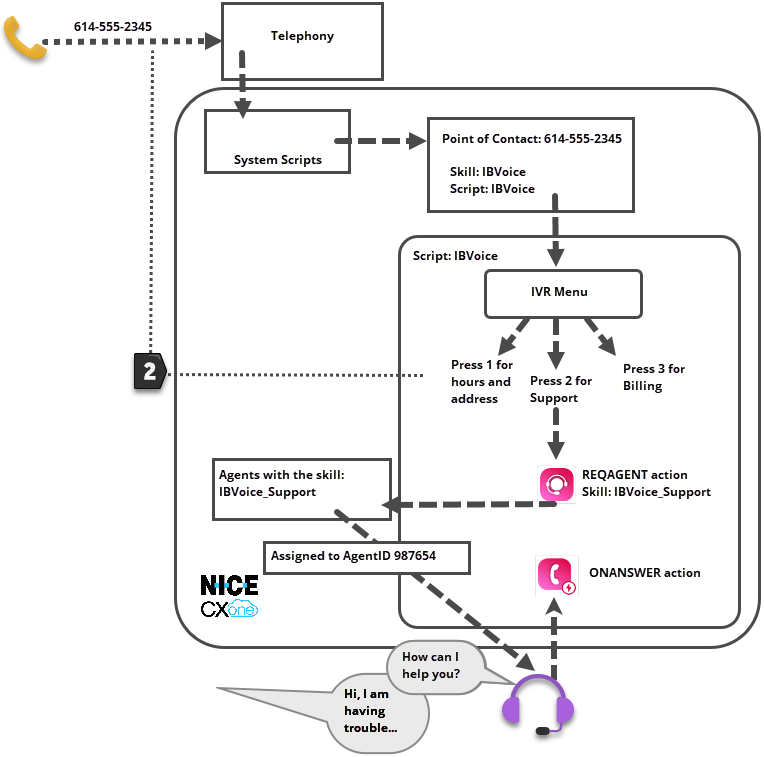
- A contact calls the phone number 614-555-2345.
- The telephony system connects the call with NiCE CXone system scripts.
- The system scripts look up the point of contact The entry point that an inbound contact uses to initiate an interaction, such as a phone number or email address. (614-555-2345), then call the script defined in the point of contact.
- The script plays the IVR Interactive Voice Response. Automated phone menu contacts use via voice or key inputs to obtain information, route an inbound voice call, or both. menu options for the contact, who presses 2 to talk to the support department.
- The script follows the script branch for 2, which leads to the Reqagent action configured with the IBVoice_Support ACD skill Used to automate delivery of interactions based on agent skills, abilities, and knowledge..
- The script assigns the IBVoice_Support ACD skill to contact and puts them in a queue for agents with that skill.
- When an agent with the IBVoice_Support ACD skill is available, they answer the call, which triggers the OnAnswer event action.
- The IBVoice script continues to run until the end of the conversation between the agent and the contact (not shown in diagram).
The following image shows a diagram of routing a digital contact using a script. A text description of the routing path follows the image in the drop-down.
View image
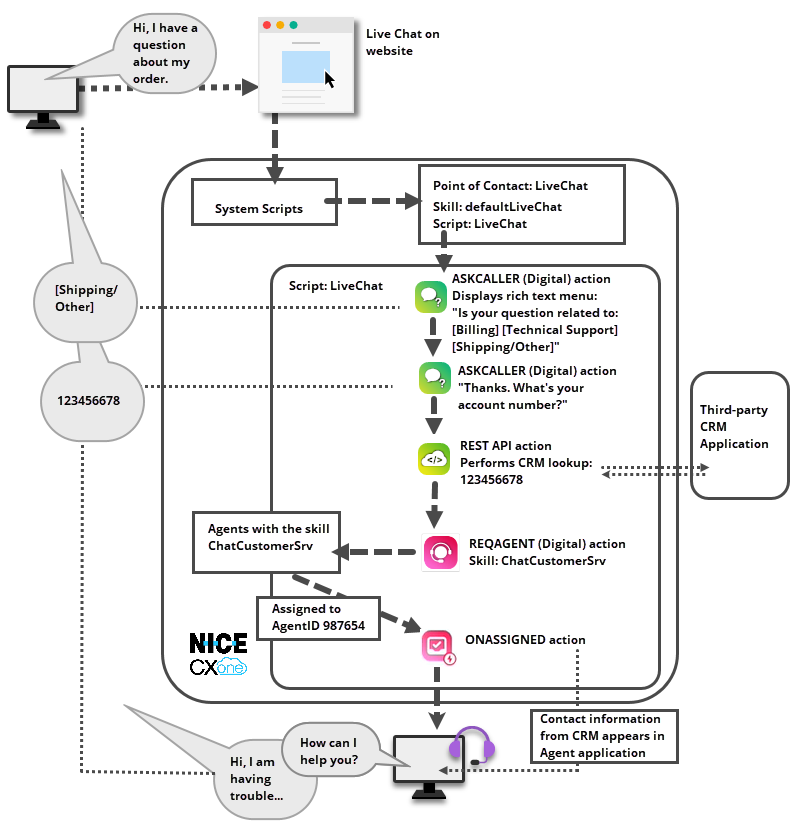
- A contact goes to the company website and uses the live chat Agents and contacts interact on a real-time basis. window on the home page to start a chat conversation.
- The chat window connects with NiCE CXone system scripts, which look up the point of contact The entry point that an inbound contact uses to initiate an interaction, such as a phone number or email address. for the chat window and calls the custom script defined in the point of contact.
- The custom script runs. In the example, it includes digital
- The
- When the script is ready to request an agent for the contact, it fires the digital Used to automate delivery of interactions based on agent skills, abilities, and knowledge..
- NiCE CXone waits for an agent with the ChatCustomerSrv digital ACD skill defined in the
- When an agent is available, NiCE CXone assigns the contact to them. This triggers the
- The contact's information from the CRM application appears in the agent application.
- The LiveChat script continues to run in the background (not shown in the diagram) for the duration of the contact, until the contact ID is terminated. This may include going to sleep at various points, such as while waiting agent or contact to respond to the latest message.
Points of Contact and ACD Skills
All digital and traditional ACD contacts enter NiCE CXone through points of contact The entry point that an inbound contact uses to initiate an interaction, such as a phone number or email address. (POC). A POC is the specific instance of a channel that contacts use to communicate with your organization. They connect NiCE CXone to the phone number, email address, chat window, or social media account contacts use when starting an interaction with your company.
In addition to the details connecting the POC to the channel Various voice and digital communication mediums that facilitate customer interactions in a contact center. it works with, all POCs must also have the following:
- A Studio script: The script must define what happens from the time that the contact starts the interaction. The rest of the interaction can be defined in the same script or in subscripts called from the main script. Traditional ACD POCs require a script with a media type that matches the channel assigned to the POC. For example, a voice channel must have a script with the phone media type. Digital POCs don't need to have a channel-specific media type like ACD POCs do. All digital scripts use the digital media type.
- A default digital ACD skill : The digital ACD skill Used to automate delivery of interactions based on agent skills, abilities, and knowledge. can be a default or generic skill for the channel. You can add logic to the script to refine which skill is assigned to contacts. For example, in phone scripts you might set up an IVR Interactive Voice Response. Automated phone menu contacts use via voice or key inputs to obtain information, route an inbound voice call, or both. menu. In digital scripts, you can ask the contact questions with the
Digital POCs are created on the Digital > Point of Contact Digital page in the ACD application. Online help for creating digital POCs is available on the page for setting up each channel. You can find links to each setup page on the Digital Channels help page.
Contact Routing Paths
The routing of traditional ACD and digital contacts follows a similar path. System scripts match the contact with the POC they used to contact your company. The system scripts then assign the default ACD skill defined in the POC to the contact and call the script defined in the POC. The custom script takes over handling of the contact.
One of the Studio actions Performs a process within a Studio script, such as collecting customer data or playing music. that both traditional ACD and digital scripts use is Reqagent. This action has a digital version that works with digital scripts. Both versions of Reqagent request an agent that matches the specified criteria to handle the interaction. The criteria include the ACD or digital ACD skill and the agent's proficiency The level of expertise an agent has in an ACD skill. Helps determine which agents to route interactions to for that skill. in that skill.
What happens after an agent is requested differs between traditional ACD and digital routing:
- Traditional ACD routing: The contact is placed in a queue. When an agent answers the interaction, the State that allows an agent to complete work requirements after finishing an interaction. or launching an agent assist Software application that provides context-specific help to the agent. application can happen.
- Digital routing: The contact is placed in a queue. When an agent has availability, the contact is assigned to the agent and the
After
In traditional ACD interactions, a contact is sometimes assigned a different contact ID, such as when the contact is transferred to a new agent. This doesn't happen with digital contacts. A digital contact keeps the same contact ID for the entire interaction.
Interaction Duration and Script Sleep-Wake Cycles
Traditional ACD interactions generally last for minutes or hours. The scripts that route these interactions actively run for the duration of the interaction.
Digital interactions can last for minutes, hours, days, weeks, or even months. To support this and to preserve system resources, digital scripts "sleep" when they're not active. They automatically wake up when there's an action they need to perform, then they go back to sleep again.
For example, after the
The sleep-wake cycle of digital scripts happens automatically. You don't need to do anything in your script to make it happen. It cannot be prevented, either. This cycle is designed to efficiently preserve system resources. By limiting the number of scripts in active memory at any point, the total number of digital contacts NiCE CXone can handle concurrently increases.
The agent doesn't have to be assigned to the contact for the entire interaction. Unassigning agents from contacts removes the contact from the agent's inbox, leaving the contact in NiCE CXone in a post-contact state. The next time the contact sends a message, an agent is assigned to it. It could be the same agent or a different one. Unassigning can happen in three ways:
- Agents can unassign themselves.
- The Digital Experience (DX) administrator can create WFA rules to automatically unassign agents.
- If your agents use Agent Workspace (Agent), the Agent Workspace (Agent) administrator can configure an amount of time after which contacts are automatically unassigned from the agent if they don't respond.
The
Termination of Scripts and Contact IDs
Each script must have an action that signals the completion of the script. These terminating actions are a required action for all scripts. They perform important cleanup work that's needed to completely end each interaction and contact ID, such as ending background processes and recording information in databases.
In traditional ACD scripts, there are a number of terminating actions available. The one you use depends on the script media type. All traditional ACD terminating actions terminate the script. They also terminate the contact ID by changing the contact's status to Complete. Once the contact ID is terminated, the Third-party systems that manage such things as contacts, sales information, support details, and case histories. application.
For digital scripts, the only supported terminating action is
- Agents can close the contact from the agent application.
- The Digital Experience (DX) administrator can create Workflow Automation rules in NiCE CXone to automatically to close the contact given specified conditions.
- You can use the
- Customers can end the interaction. This option is only supported for live chat channels.
After the a digital contact ID has been terminated, the
Digital Routing with Routing Queues
Prior to the Summer 2023 release, digital contacts were primarily routed using digital routing queues. This method requires digital ACD skills but not Studio scripts. The digital channel Various voice and digital communication mediums that facilitate customer interactions in a contact center. created in NiCE CXone functions as both the channel and the point of contact. This means that the contact enters NiCE CXone directly through the channel and is handled by routing queue rules. Routing queue rules assign contacts to ACD skills using filtering rules, which are created on the Routing Queues page.
This routing method is still available in NiCE CXone. However, it's not the preferred method for routing contacts. It's easier to build and troubleshoot the routing workflow using the visual interface of a Studio script. When routing with routing queues, it can be a challenge to keep track of the many rules required to route contacts.
You can only use one routing method for each POC The entry point that an inbound contact uses to initiate an interaction, such as a phone number or email address.. When a Studio script is assigned to a POC, routing queues no longer work for inbound contacts that come into the POC. To route contacts using routing queues, you need to set up routing rules and filters in NiCE CXone.
The following image shows a diagram of routing a digital contact with Digital Experience (DX) routing queues. A text description of the routing path follows the image in the drop-down.
View image
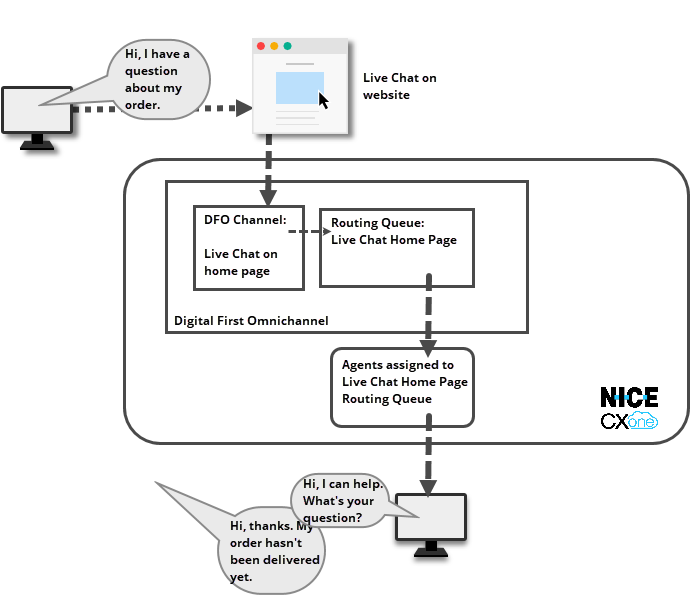
- A contact goes to the company website and uses the live chat window on the home page to start a chat conversation.
- The live chat channel is the point of contact and is defined in Digital Experience (DX). It has a routing queue called Live Chat Home Page assigned to it.
- Digital Experience (DX) places the contact into the Live Chat Home Page queue.
- The Live Chat Home Page routing queue has agents assigned to it. When one of those agents is available, they answer the chat and begin the conversation.
- Workflow automation rules define any additional routing or handling needs, including closing the contact at the end of the conversation (not shown in diagram).
Outbound Digital Interactions
Outbound digital interactions are not routed by Studio scripts and digital skills Used to automate delivery of interactions based on agent skills, abilities, and knowledge.. Instead, outbound digital routing relies on routing queues Determine which agents to route digital cases to, using criteria such as the agent having expertise in that type of case. . You cannot create new routing queues, but you can modify existing ones.
Replies are not routed to agents without digital skills. You can use a workflow automation (WFA) rules to assign a digital skill to interactions. Configure your routing queues with filters to set up the conditions for the skill you want the outbound message to use. Then, create one or more WFA rules that assign the appropriate digital skill to messages based on the conditions set up in your routing queues. This ensures that when the contact replies, the message is routed to an agent.
There is an option in ACD to create outbound digital skills, but they only work with Personal Connection (PC) campaigns on supported digital channel. They cannot route interactions to agents.
Workflow Automation
Workflow Automation (WFA) is a rules engine in Digital Experience (DX). WFA rules define the criteria for certain tasks. When those criteria are met with digital contacts, Digital Experience (DX) performs the defined task.
You can use WFA together with Studio scripts to manage contacts and interactions. WFA and Studio work independently, but in parallel. There are some tasks that can be done in both places. You should decide how you want to accomplish those tasks so they're managed in one place and not both. For example, if you have a WFA rule that ends a contact and adds data to your CRM Third-party systems that manage such things as contacts, sales information, support details, and case histories., you don't need to configure the
One of the most important behaviors that you need to define in WFA is ending contacts. In digital scripts, the
Prequeue Decision-Making
It's helpful to be able to determine a contact's reason for contacting your organization. This allows you to assign a new ACD skill Used to automate delivery of interactions based on agent skills, abilities, and knowledge. to the contact, which makes it more likely that the agent who handles the interaction can take care of the contact's needs. The more specific your skills are, the more targeted you can make the agent assignments and reduce the need to transfer contacts to different agents.
In a traditional phone script, you can create an IVR Interactive Voice Response. Automated phone menu contacts use via voice or key inputs to obtain information, route an inbound voice call, or both. menu using the
In digital scripts, you cannot create an IVR in the same way, but you can determine the contact's needs in other ways. For example, you can:
- Create menus of options using rich media options.
- Use the
- Use a virtual agent that's trained to answer simple questions and perform triage at the start of a interaction.
- Use Guide on your company website.
Screen Pops in Digital Interactions
In traditional ACD interactions, there are two options for configuring screen pops:
- At the ACD skill Used to automate delivery of interactions based on agent skills, abilities, and knowledge. level.
- Using the POPURL action or the
For digital interactions, configuring screen pops at the ACD skill level doesn't work, so you must use the actions.
Studio Actions for Digital Scripts
To see a list of the actions supported in digital scripts, go to the Studio Actions page. Open the Filter by Script Media Type filter and select the Digital option.
Basic Inbound Digital Scripts
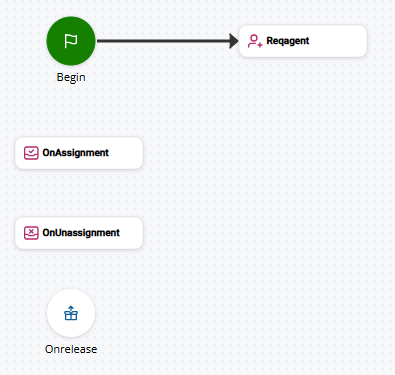
Digital scripts can vary widely in their design, just like scripts for other media types A medium, such as voice, email, and chat, through which a contact connects with an intended recipient.. A very basic inbound digital script has the following actions:
- A BEGIN action connected to a REQAGENT action, which allows you to define what happens before the contact The person interacting with an agent, IVR, or bot in your contact center. is assigned to an agent.
- An ONASSIGNMENT action, which replaces the ONANSWER action used for other media types. It triggers when the interaction The full conversation with an agent through a channel. For example, an interaction can be a voice call, email, chat, or social media conversation. is delivered to an agent.
- An ONUNASSIGNMENT action, which allows you to define what happens when an agent unassigns themselves from an interaction.
- An ONRELEASE action, which processes the end of the interaction. Digital interactions require no additional terminating actions.
The following image shows a basic digital script.