

Customer Integration Guide - Avaya CMS
Introduction
This guide supports customers integrating on-premises Avaya CMS (version 17.0 and above) with NiCE CXone WFM using the Engagement Hub. It provides implementation guidance for voice and chat channel integrations, targeting IT administrators, system integrators, and WFM planners.
Scope
This guide:
-
Covers historical, real-time, and intraday data exchange.
-
Applicable to voice channel integrations.
-
Designed for Avaya CMS version 17 and above.
Customer responsibilities
-
The customer is responsible for downloading and installing the connector, with guidance from the implementation team.
You can view the contents of the Downloads page only after logging into the NiCE CXone WFM application. If you are not logged in, no files will be available for download.
-
The customer must configure Avaya system channels and routing as required.
-
An active subscription to Avaya CMS is required, along with the appropriate licenses for the channels and for NiCE CXone WFM.
-
During installation of the Avaya CMS connector, the customer must provide JDBC connection details.
-
For real-time data, the customer must configure the Avaya CMS system with the host and port of the machine where the connector is installed.
-
Assign a technical point-of-contact to coordinate with the implementation team.
Integration Overview
Prerequisites
Ensure the following configurations and access are in place before implementation:
-
Historical data is accessed via JDBC.
-
Real-time agent state events are accessed via TCP.
-
Ensure accessibility to the IBM Informix database.
-
Configure the firewall to allow outbound traffic on ports 443 and 80.
-
Agent IDs and Skill IDs must be mapped in NiCE CXone WFM according to customer-specific requirements.
-
Provide access to a testing environment for validation and configuration.(if applicable)
Architecture
-
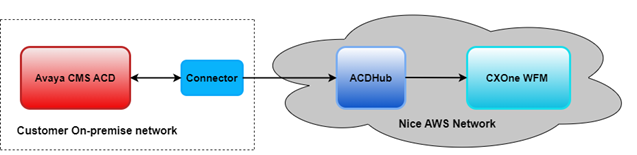
Avaya CMS (on-prem) → Connector → ACD Hub → CXone WFM.
-
The Avaya CMS Connector provides Historic & RTA functionality for Engagement Hub Integration.
-
The Engagement Hub setup is on the NiCE owned AWS account.
-
The Avaya CMS Connector setup is hosted on the customer on-premise.
Supported media types
-
Inbound Voice
-
Manual Outbound Dialer
-
Chat
Media channel classifications
-
Immediate response (via inbound voice)
-
Deferrable response (via chat)
-
Outbound (via manual outbound dialer)
Protocols
-
For real-time, the customer has to configure Avaya CMS system with host and port of the machine where Avaya CMS connector is installed.
-
For historical reports, Avaya CMS connector establishes JDBC connection with Avaya CMS system.
Data types supported
-
Historical Data (15 min)
-
Forecast data
-
Intraday
-
Adherence Prebuilt report
-
-
Real-Time Adherence (Agent State Transitions) via Connector
Data retrieval specifics
Avaya CMS connector supports these data retrieval mechanisms:
-
Real Time: Avaya CMS connector will listen to TCP host & port configured in Avaya CMS system for real time agent state events.
-
Historical: Avaya CMS connector will establish JDBC connection with Avaya CMS system to fetch historical data periodically.
.png)
Deployment models
On-prem ACD with on-prem connector, with cloud-based WFM.
Contact data pegging
-
Contacts Pegging - interval when contact completes
-
Contact Time Values - interval when contact completes
All the values for Engagement Hub integration contacts are pegged at the end in the interval when the contact completes.
Example: If a contact begins in one 15-minute interval (12:00 to 12:15) and completes in another interval (12:15 to 12:30), the contact is pegged in the interval when the contact completes (12:15 to 12:30).
Historical Integration
Historical: Avaya CMS connector will establish JDBC connection with Avaya CMS system to fetch historical data periodically.
Report data is available in 15-minute intervals. Here are the supported data sets:
Data mapping & definitions
Report data is available in 15-minute intervals. Here are the supported data sets:
Queue Data
Table name from Avaya CMS Informix DB: hsplit
The following attributes can be configured using Queue Data Report:
|
CXone WFM field Name |
Avaya CMS ACD field Name |
|---|---|
| QueueValue | Field not available with ACD |
| QueueName | SPLIT |
| IsOutbound | Field not available with ACD |
| ContactsReceived | CALLSOFFERED - DEQUECALLS - OUTFLOWCALLS |
| AbandonedShort | Field not available with ACD |
| AbandonedLong | ABNCALLS |
| HandledShort | Field not available with ACD |
| HandledLong | ACDCALLS |
| HandleTime | ACDTIME |
| WorkTime | ACWTIME |
| QueueDelayTime | RINGTIME |
| SvcLvlPct | SERVICELEVEL OR 100* (ACCEPTABLE / (ACDCALLS + ABNCALLS)) |
| RightPartyHandleTime | O_ACDTIME |
| RightPartyContacts | O_ACDCALLS |
| WrongPartyHandleTime | Field not available with ACD |
| WrongPartyContacts | Field not available with ACD |
| Backlog | MAXINQUEUE |
| BacklogNotExpired | CALLSOFFERED - (ABNCALLS + DISCCALLS) |
| BacklogExpired | DISCCALLS |
| HoldTime | HOLDTIME |
| Active | Not Applicable |
Table name from Avaya CMS DB: hagent
The following attributes can be configured using Agent Queue report:
|
CXone WFM field Name |
Avaya CMS ACD field Name |
|---|---|
| QueueValue | Field not available with ACD |
| QueueName | SPLIT |
| IsOutbound | Field not available with ACD |
| AgentValue | LOGID |
| AgentId | Field not available with ACD |
| Handled | ACDCALLS |
| HandledTime | ACDTIME |
| WorkTime | ACWTIME |
| RightPartyHandleTime | O_ACDTIME |
| RightPartyContacts | O_ACDCALLS |
| WrongPartyHandleTime | Field not available with ACD |
| WrongPartyContacts | Field not available with ACD |
| HoldTime | HOLDTIME |
| Active | NOT APPLICABLE |
Table name from Avaya CMS DB: hagent
The following attributes can be configured using Agent System Performance Report:
|
CXone WFM field Name |
Avaya CMS ACD field Name |
|---|---|
| AgentValue | LOGID |
| AgentId | Field not available with ACD |
| ReadyTime | TI_AVAILTIME |
| ReadyTime | TI_OTHERTIME |
| LoginTime | Field not available with ACD and not mandatory for Intraday |
Table name from Avaya CMS DB: ag_actv
The following attributes can be configured using Agent Activity Report:
|
CXone WFM field Name |
Avaya CMS ACD field Name |
|---|---|
| AgentValue | Field not available with ACD |
| AgentId | LOGID |
| UserName | Field not available with ACD |
| State | workMode+"" |
| StartTime | STARTTIME_UTC |
| Duration | duration |
| Reason | If WORKMODE value is 110 then reason should be LOGOUTREASON considered otherwise AUXREASON should be considered. |
This mapping provides a basic reference for how dashboard components function within the default configuration. However, component behavior may vary based on specific customer requirements
Real-Time Integration
The Real-Time Adherence (RTA) interface provides agent data, specifically their current states, from Avaya CMS to NiCE NiCE CXone WFM.
Data mapping
Real time agent states data
|
Fields Required |
Is Available |
|---|---|
| loginId | Yes |
| acdId | Yes |
| eventCode | Yes |
| reasonCode | Yes |
| eventUtcTime | Yes |
Default agent states
|
Standard CMS RTA events |
Event identifier |
Reason code |
Definition |
|---|---|---|---|
| 0 | 0 | Unknown | |
| 10 | 10 | Unstaff | |
| 20 | 20 | Available | |
| 30 | 30 | ACD | |
| 31 | 31 | ACD Out | |
| 32 | 32 | ACD In | |
| N/A | 600 | 0 | AUXOutonHold |
| N/A | 600 | 1 to 99 | AUXOutonHold w/Reason (600 sent in field 2, Reason sent in field 4) |
| 40 | 40 | ACW | |
| 41 | 41 | ACW Out | |
| 42 | 42 | ACW In | |
| 50 | 50 | 0 | Pure AUX |
| 50 | 50 | 1 to 99 | AUX w/Reason Code 1-99 (50 sent in field 2, Reason sent in field 4) |
| 51 | 51 | AUX Out | |
| 52 | 52 | AUX In | |
| 60 | 60 | DACD | |
| 61 | 61 | DACD Out | |
| 62 | 62 | DACD In | |
| 70 | 70 | DACW | |
| 71 | 71 | DACW Out | |
| 72 | 72 | DACW In | |
| 80 | 80 | Ring | |
| 100 | 100 | Logon - transient - rarely seen | |
| 110 | 110 | Logoff - transient - rarely seen | |
| 220 | 220 | Other | |
| N/A | 700 | Agent On Hold |
Data constraints
-
NiCE NiCE CXone WFM Agent Logon ID = Agent ID
-
Logon ID max length = Unlimited - system generated ARN (maximum 256 characters)
-
NiCE NiCE CXone WFM Agent State = Agent's current state
-
Agent State max length = 100 characters
Observations & Limitations
Observations
Sample(verified or added after customer onboarding):
-
Handle Time and Talk Time are calculated at the end of the interaction interval.
-
AUX/ACW states depend on accurate agent state transitions.
-
Queue mapping can affect accuracy of service level metrics.
Known limitations
-
Automated and manual Replay and Reload mechanisms are not supported.
-
Real-time integration may not support sub-second agent state updates.
-
Reposting historical data requires manual intervention and validation.
-
Metrics can be skewed if agent logins/logouts do not occur within same interval.
-
CMS-generated fields may differ in interpretation depending on report structure.
Monitoring & Troubleshooting
Monitoring
-
Log files on Connector.
-
Data delivery confirmation.
-
WFM import status dashboard.
Troubleshooting tips
-
Check agent/queue mismatches.
-
Ensure CMS scripts generate in correct format (CSV/JSON).
-
Validate file timestamps and interval alignment.
FAQs
-
Can I export custom reports from CMS?
Yes, provided they meet field and format requirements.
-
What if agent IDs change?
Ensure consistent ID mapping to avoid adherence mismatches.
-
Can real-time adherence include AUX state tracking?
Yes, AUX, ACW, and Ready/Not Ready states are tracked if supported by your CMS version and report configuration.
-
What are the technical requirements for integration?
Over 350 MB disk space for installation and at least 1GB for execution.
-
How is data security handled during integration?
As per each customer's requirement because customer configures their internal network as per their security requirements.
-
Can multiple Avaya CMS instances be integrated into a single NICE WFM environment?
Currently only 1 ACD mapping is been supported.
-
What happens if the integration fails or data is delayed?
Reach out to the support team.
-
Is there any downtime required during setup?
For new customer, downtime is as per the initial CXOne WFM setup process.
Revision History
|
Revision |
Date |
Description |
|---|---|---|
| 1.0 | 8/1/25 | Initial version of document. |